3D Layered Sea Shells V3: A Versatile Digital Cut File for Creative Projects
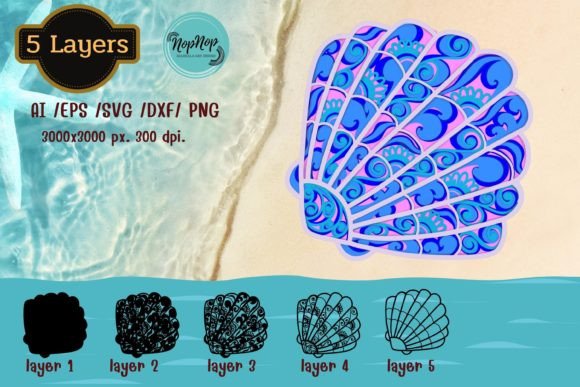
If you're someone who loves hands-on crafting or runs a small creative business, you know how important it is to find high-quality digital files that can be adapted to multiple projects. The 3D Layered Sea Shells V3 is one such resource—offering detailed, layered designs ideal for laser cutting, printing, and digital crafting. With an artboard size of 3000 × 3000 pixels and a resolution of 300 dpi, this file set ensures crisp, professional results every time.
What Is Included in the 3D Layered Sea Shells V3 Download?
When you purchase the 3D Layered Sea Shells V3, you get five unique layered designs packed into a single zip file. Each design comes in various file formats, including:
- AI – ESP: Compatible with Adobe Illustrator, Make the Cut, Corel Draw, and Inkscape.
- SVG: Perfect for use in Cricut Design Space, Silhouette Designer Edition, and ScanNCut software.
- DXF: Great for Glowforge and other laser cutting machines.
- PNG: Includes both color PNGs for visual reference and black PNGs for actual printing or cutting.
This variety makes it easy for users across different platforms to work with the same designs without conversion issues or loss of quality. Whether you're using vector-based software or preparing files for a laser cutter, everything you need is already included.
1. Custom Wedding Invitations and Decor
Wedding planners and DIY enthusiasts often look for elegant yet customizable designs. The sea shells in this collection can be used to create stunning invitations, table centerpieces, or signage. For example, a designer might layer these shells on a textured cardstock background and add gold foil accents to match a beach-themed wedding. The 3000 × 3000 pixel canvas allows for larger-scale prints if needed, like wall art or directional signs at the venue.
2. Educational Crafts and Science Displays
Educators teaching marine biology or ocean science can use the 3D Layered Sea Shells V3 to create engaging visual aids. Students can print and cut the shells from colored paper to build models of ocean ecosystems or classify different shell types. The layered format also helps demonstrate depth and structure, making abstract concepts more tangible for learners of all ages.
3. Small Business Branding and Packaging
Small businesses selling handmade jewelry, bath products, or home décor can leverage these sea shell designs to elevate their branding. A soap company, for instance, might laser cut the shells onto kraft tags or wooden boxes as labels or packaging elements. Using different colored papers during cutting adds subtle variation to each item, giving the brand a personalized touch.
4. Seasonal Home Décor Projects
As the seasons change, many people enjoy updating their living spaces. These sea shells can be transformed into wall art, shadow boxes, or even holiday decorations. During summer, they could be part of a coastal-themed display. In winter, the same design might appear on a minimalist white backdrop as a fresh, clean accent. Because the files are layered, you can experiment with spacing and depth to make your creations stand out.
5. Personalized Gifts and Keepsakes
Crafters love creating meaningful gifts for friends and family. The 3D Layered Sea Shells V3 provides a great base for items like framed keepsakes, custom greeting cards, or engraved mugs. Imagine using a laser cutter to engrave a set of shells onto a piece of wood, then adding a photo of a loved one’s vacation by the sea. The result is a thoughtful, tactile gift that stands apart from mass-produced alternatives.
How Different Users Can Benefit from These Files
Whether you're a hobbyist, entrepreneur, educator, or marketer, the 3D Layered Sea Shells V3 can serve a range of purposes. Here's how different users might apply them:
- Freelancers and Graphic Designers: Use the AI and SVG files to incorporate realistic shell layers into client projects, such as logos, illustrations, or website graphics.
- Small Business Owners: Integrate the DXF and PNG files into product packaging, store displays, or promotional materials to enhance brand identity with a natural aesthetic.
- Bloggers and Content Creators: Print the color PNGs as mockups for social media posts or tutorials, showing off finished craft projects in a visually appealing way.
- Hobbyists and Crafters: Take advantage of the layered design to create intricate paper sculptures, scrapbook pages, or decoupage pieces that add dimension to any project.
The versatility of these files means they aren’t just limited to one medium or application. You can print them on fabric for embroidery stencils, cut them from acrylic for signage, or even use them as templates for hand-painting. The key is understanding how the layers interact and how best to translate that into your chosen material.
Things to Consider Before Purchasing or Using the Files
Before downloading the 3D Layered Sea Shells V3, there are a few practical considerations to keep in mind:
- Software Compatibility: Check which programs you use regularly. If you're working with Adobe Illustrator, Make the Cut, or Glowforge, you’ll find the corresponding files helpful. If not, consider whether learning a new tool would benefit your workflow.
- Printing vs. Cutting: Understand the difference between the color PNGs (for visual samples) and the black PNGs (for actual printing). Also, note that the background seen in sample images isn't included in the final file—so you'll need to handle that yourself.
- Material Choice: Since the files are intended for digital cutting, choose materials that work well with your machine. Paper, vinyl, chipboard, and acrylic are all popular options, but some may require adjustments in layer thickness or spacing.
- Project Scale: While the artboard is large enough for most standard projects, if you plan to create something bigger than typical laser-cutting sizes, you may need to adjust or scale the design accordingly.
These factors ensure that once you’ve downloaded the files, you’re ready to use them effectively without unnecessary trial and error. It also helps avoid disappointment when the final output doesn’t meet expectations due to overlooked details.
Why Choose 3D Layered Sea Shells V3 Over Other Designs?
One major reason to choose this specific design is its attention to detail and realism. Unlike flat, two-dimensional clipart, the layered approach mimics the natural contours of real sea shells, giving your projects a sense of depth and authenticity. This makes the 3D Layered Sea Shells V3 especially useful for those aiming to replicate nature-inspired themes.
Another advantage is the inclusion of multiple file types. Not every user has the same tools or preferences, so having access to formats like AI, SVG, DXF, and PNG ensures broad usability. Additionally, the ability to mix and match colors when cutting opens up endless customization possibilities—whether you're going for a pastel palette or bold contrasts.
Getting Started with Your New Digital Files
Once you've downloaded the 3D Layered Sea Shells V3, open the zip file and explore the contents. Start by selecting the appropriate file type based on your machine or software. For laser cutting, the DXF file works best; for digital illustration, the AI file is more suitable.
Import the file into your design software and take a moment to understand how the layers are structured. You can rearrange, resize, or delete layers depending on your needs. When it comes to printing or cutting, always preview the layout before sending it to your machine. Test cuts on scrap material first to ensure alignment and proportions are correct.
Remember, the beauty of layered designs lies in experimentation. Try different materials, layer combinations, and color schemes to see what works best for your vision. And don’t forget the colored PNGs—they’re perfect for planning ahead or sharing your ideas with clients or collaborators.
Final Thoughts on Realistic Outcomes and Practical Benefits
The 3D Layered Sea Shells V3 isn’t just another digital file—it’s a foundation for creativity. Whether you're designing a boutique’s seasonal window display or helping students learn about marine life through hands-on activities, these files offer flexibility and professionalism. Their high-resolution format ensures clarity in both digital and physical outputs, while the layered design invites innovation and personalization.
For entrepreneurs looking to streamline their product creation process, hobbyists eager to expand their crafting toolkit, or educators wanting to bring interactive elements into the classroom, the 3D Layered Sea Shells V3 can help turn abstract ideas into tangible, beautiful results. Just remember to think about compatibility, materials, and scaling before diving in—and let your imagination guide the rest.